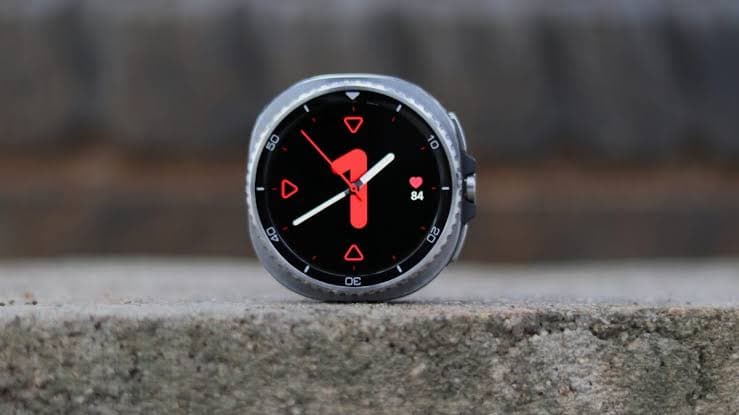
Samsung has started rolling out the stable One UI 9 Watch (Wear OS 7) update for its Galaxy Watch 8 and Watch 8 Classic globally, bringing major improvements to health tracking, watch face customisation, and app usability. Indian users can expect it soon.
Samsung has begun a global rollout of the stable One UI 9 Watch (Wear OS 7) update for its Galaxy Watch 8 and Galaxy Watch 8 Classic smartwatches. Initially released in South Korea, the update quickly made its way to the US and is now expected to reach other countries, including India, over the next few days, as SamMobile reported.
This update brings a host of new features and enhancements, particularly focusing on a redesigned Galaxy Wearable app, improved health tracking, and more intuitive watch face customisation. For Indian users, these changes could significantly enhance their daily smartwatch experience, making their Galaxy Watch 8 feel more personal and powerful.
A Fresh Look for the Galaxy Wearable App
The Galaxy Wearable app, your companion for managing the watch, gets a complete overhaul. Its settings screen is now redesigned for easier access to frequently used features, and it displays your current watch face as a high-resolution image. This means less fumbling around to find what you need, streamlining the initial setup and daily adjustments.
Smarter Watch Face Discovery and Editing
Finding the perfect watch face is often a chore, but One UI 9 Watch aims to simplify it. Watch faces are now organised into categories with detailed descriptions, helping you understand their unique features. The gallery itself has been revamped with larger thumbnails, so you can preview designs without tapping on each one. You can even swipe left or right on a thumbnail to explore different colour options and styles directly.
The update also introduces smart watch face recommendations, suggesting similar options based on what you are viewing or even matching watch faces to fashion photos you provide. For those who love to tweak, the watch face editing interface has been streamlined into two tabs: 'Style' for appearance and 'Complications' for features, making customisation much more straightforward.
Enhanced Samsung Health Experience on Your Wrist and Phone
Samsung Health is getting a significant upgrade. Key health metrics like sleep and heart health are now presented with cleaner, circular charts and a design optimised for your watch, making it easier to check your data at a glance. A standardised colour-coding system for health status indicators also helps you quickly grasp your current well-being and any changes.
The mobile Samsung Health app also sees improvements, offering a more intuitive experience. You can customise your home screen by adjusting card sizes and easily monitor categories such as activity, sleep, mindfulness, and nutrition. Improved charts allow you to zoom in or overlay different data sets, simplifying the tracking of health changes over time.
Even the measurement processes for heart rate, stress, or body composition are getting an engaging facelift with vibrant graphics and dynamic animations.
More Powerful Workouts and Proactive Health Monitoring
Workouts become more intuitive, allowing you to pause or end them using the back button without needing to touch the screen. Large, clear text and intuitive heart rate zone displays ensure you can easily keep track of essential data, even during intense physical activity.
A new Daily Cardio Load Tracking feature monitors the impact of your exercise on your heart. It provides guidance on an optimal target load to help you exercise effectively while minimising injury risk and even tells you when to rest. This target load adjusts daily based on your recent activity levels and fitness goals, offering truly personalised guidance.
For sleep, your watch can now track vital signs like heart rate, heart rate variability (HRV), respiratory rate, skin temperature, and blood oxygen levels. After establishing an initial baseline, the watch continuously monitors your health and alerts you to any significant changes. A Systematic Heart Health Management feature records metrics and lifestyle habits, providing a daily heart health score based on your sleep, exercise, BMI, and vascular stress.
New shortcut tiles have also been added for health features like daily activity, sleep coaching, and daily cardio load, providing quick access to crucial information.
Outdoor Navigation and Camera Control from Your Wrist
For outdoor enthusiasts, the compass feature now helps you navigate safely. You can mark important locations, such as where you parked or set up camp, as waypoints. If you get lost, the watch provides directional guidance. The 'return to start' or backtrack feature records your path, making it easy to retrace your steps back to your starting point, a truly useful addition for hikers or explorers.
The Camera Controller on your wrist also gets an update, adding new modes like Food, Portrait Video, Slow Motion, and Hyperlapse. You can swipe up from the bottom of the screen to access settings for switching between front and rear cameras, or adjusting options like Motion Photo and flash. Finally, customizable text size for tiles means your chosen text size now applies across all your watch tiles, improving readability.
How to Get the One UI 9 Watch Update
If you own a Galaxy Watch 8 series smartwatch, you can check for the One UI 9 Watch update by opening the Galaxy Wearable app on your paired smartphone. Navigate to Watch settings, then Watch software update, and finally select Download and install. The update for non-cellular Classic units enrolled in the beta program was 158.50MB and carried firmware version L500XXU2BZJ7, with other models expected to have similar sizes and firmware versions ending with BZJ7.