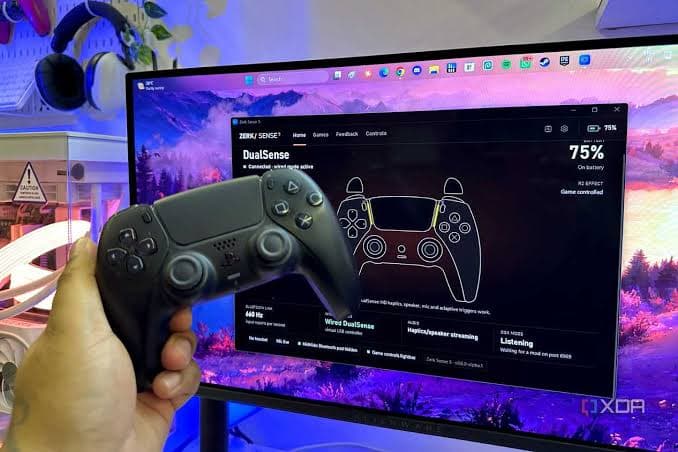
A free Windows application, ZerkSense5, now allows Sony DualSense controllers to use all advanced features wirelessly on PC, resolving a long-standing issue for gamers. It bypasses previous hardware workarounds.
PC gamers using a Sony DualSense controller can finally access its full suite of advanced features wirelessly on Windows, thanks to a new free application called ZerkSense5. This software solution reportedly eliminates the need for wired connections or specialised hardware dongles to get the most out of the PlayStation 5 gamepad.
For years, the DualSense controller has presented a frustrating dilemma for Windows PC users. While connected via USB cable, features like HD haptics, adaptive triggers, the built-in speaker, microphone, and even the 3.5mm audio jack function perfectly. However, connect it wirelessly via Bluetooth, and much of that 'magic' disappears, leaving users with what XDA Developers described as an expensive basic gamepad.
The core problem stems from how Windows handles Bluetooth audio streams. The DualSense's advanced haptics rely on an audio stream that standard Windows Bluetooth implementation doesn't expose to PC games. Adaptive triggers are less restricted, but the haptics, a key selling point of the controller, often require a direct cable connection for full functionality on most titles.
Previously, a popular workaround involved a project called DS5Dongle. This ingenious solution required users to build a small device using a Raspberry Pi Pico 2 W, which would receive the DualSense signal wirelessly and present itself to Windows as a wired controller. This meant an extra piece of hardware, costing around $10 (roughly ₹830 at current exchange rates), and a DIY effort.
ZerkSense5, as reported by XDA Developers, streamlines this process entirely. Instead of a physical dongle, it employs a software trick, creating a virtual wired controller using a utility called usbip-win2. Users simply pair their DualSense controller normally over Bluetooth, run ZerkSense5, and the application handles the rest, making Windows and games perceive the wireless controller as a cabled one.
The app isn't just about basic functionality; it offers extensive control. According to XDA Developers, ZerkSense5 allows users to fine-tune trigger sensitivity and haptic intensity, even letting them double the rumble for specific games. A standout feature is its ability to record DualSense trigger behaviour from one game, like The Witcher 3 Remastered, and apply it to another that lacks native support, such as Elden Ring, potentially enhancing the gaming experience.
For Indian PC gamers, this free and open-source solution is a big deal. It means not having to spend extra money on a Raspberry Pi Pico 2 W or opt for paid alternatives like DualSenseX, which offers similar wireless capabilities. Avoiding additional hardware costs is always a plus for value-conscious consumers here.
While ZerkSense5 offers a compelling software-only approach, the DS5Dongle with a Pico 2 W still has a niche advantage. If you frequently switch your DualSense between multiple PCs, the hardware dongle remains a portable, plug-and-play solution that you can carry along. With ZerkSense5, you would need to install and configure the software on every PC.
Ultimately, for most PC gamers who primarily use their DualSense with a single Windows machine, ZerkSense5 presents itself as the most frictionless method to enjoy the controller's full potential wirelessly. It’s a simple download from a GitHub repository, and once configured to start with Windows, you might never need that USB cable again.