XDA Developers highlights Samsung DeX as a powerful, desktop-like mode on Galaxy phones that many users don't explore. It offers PC-like multitasking and app experiences with minimal investment.
A recent report from XDA Developers highlights Samsung DeX as an incredibly useful feature on Galaxy smartphones that many owners are overlooking. The desktop mode, which debuted with the Samsung Galaxy S8 series, allows users to transform their phone into a PC-like experience when connected to an external display.
According to XDA Developers, while smartphone manufacturers often focus on hardware, Samsung has consistently invested in DeX for years. Despite its maturity, the feature remains largely unexplored by a significant portion of Galaxy users.
DeX UI and App Experience
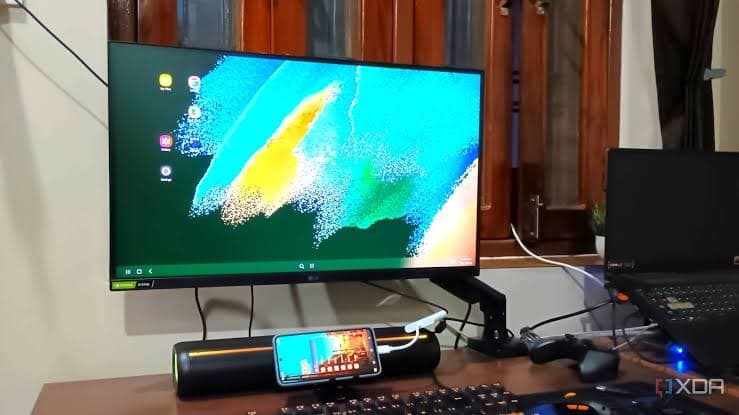
XDA Developers notes that the current version of DeX offers an experience remarkably close to a traditional desktop. The user interface is designed to feel familiar, with quick settings, notifications, an app launcher, and recent apps all positioned logically, similar to what you'd find on a Windows or Linux PC.
A key aspect of DeX's utility is how apps adapt. XDA Developers observed that many popular applications, including Chrome, Google Docs, and Gmail, scale well to a larger screen without appearing stretched. This allows for a smooth web browsing experience and efficient productivity, such as managing emails in a split-screen view. Major collaboration tools and Microsoft Office apps also perform well, supporting dual app windows for improved multitasking.
However, the report mentions that some regional apps might not offer the same optimised experience, which is a minor consideration for most users.
Setting Up Your DeX Workspace
Samsung DeX supports both wired and wireless connections. For a wired setup, which is relevant for monitors, you will need a USB Type-C to HDMI hub. XDA Developers noted that such an adapter, typically costing around $10, is the primary investment required. These hubs often include additional ports, which are crucial.
The extra ports allow for power delivery, ensuring your phone stays charged during longer sessions, and also accommodate wired peripherals like a keyboard and mouse. While Samsung's official DeX Pad and DeX Station docks exist, XDA Developers advises against them as they are older, expensive, and not compatible with the latest phone models.
Practical Uses for DeX in India
For Indian users, DeX presents several compelling use cases. It can serve as a convenient solution for urgent work tasks when a PC isn't readily available, enabling users to access websites, respond to emails, or make minor edits on a larger screen. This flexibility means you can carry your 'PC' in your pocket.
Another significant advantage is repurposing an older Galaxy smartphone into a lightweight PC. This can be a cost-effective solution for basic computing needs like web surfing, streaming YouTube, and playing local media. High-end Samsung Galaxy phones can even run some PC games using third-party apps like GameNative, suitable for lighter titles.
XDA Developers also suggests DeX as an excellent stepping stone for children or parents who might not need a full-fledged computer, offering a familiar desktop environment without the investment in new hardware. The UI is generally intuitive, making it accessible for various users.
Looking Ahead for High-End Galaxy Devices
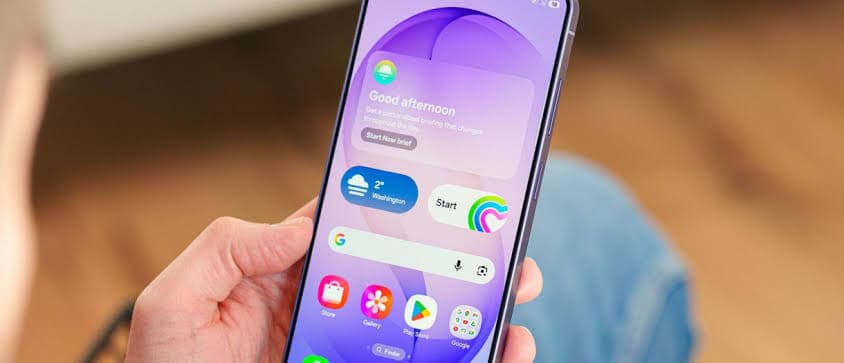
The report from XDA Developers also briefly mentioned the Samsung Galaxy S26, tipped to feature a Snapdragon 8 Elite Gen 5 processor and a 6.3-inch Dynamic AMOLED 2x display. While specific details about the S26 are still emerging, such high-end specifications suggest future Galaxy devices will have ample power to deliver an even more robust and responsive DeX experience.
If you own a compatible Samsung Galaxy phone and have not yet explored DeX, XDA Developers recommends giving it a try. The feature is far from a basic, unpolished interface and offers genuine PC-like multitasking capabilities with popular apps, requiring only a modest investment in peripherals.